Skip to content

Analysis & Postprocessing

Postprocessing results

125 Topics 382 Posts
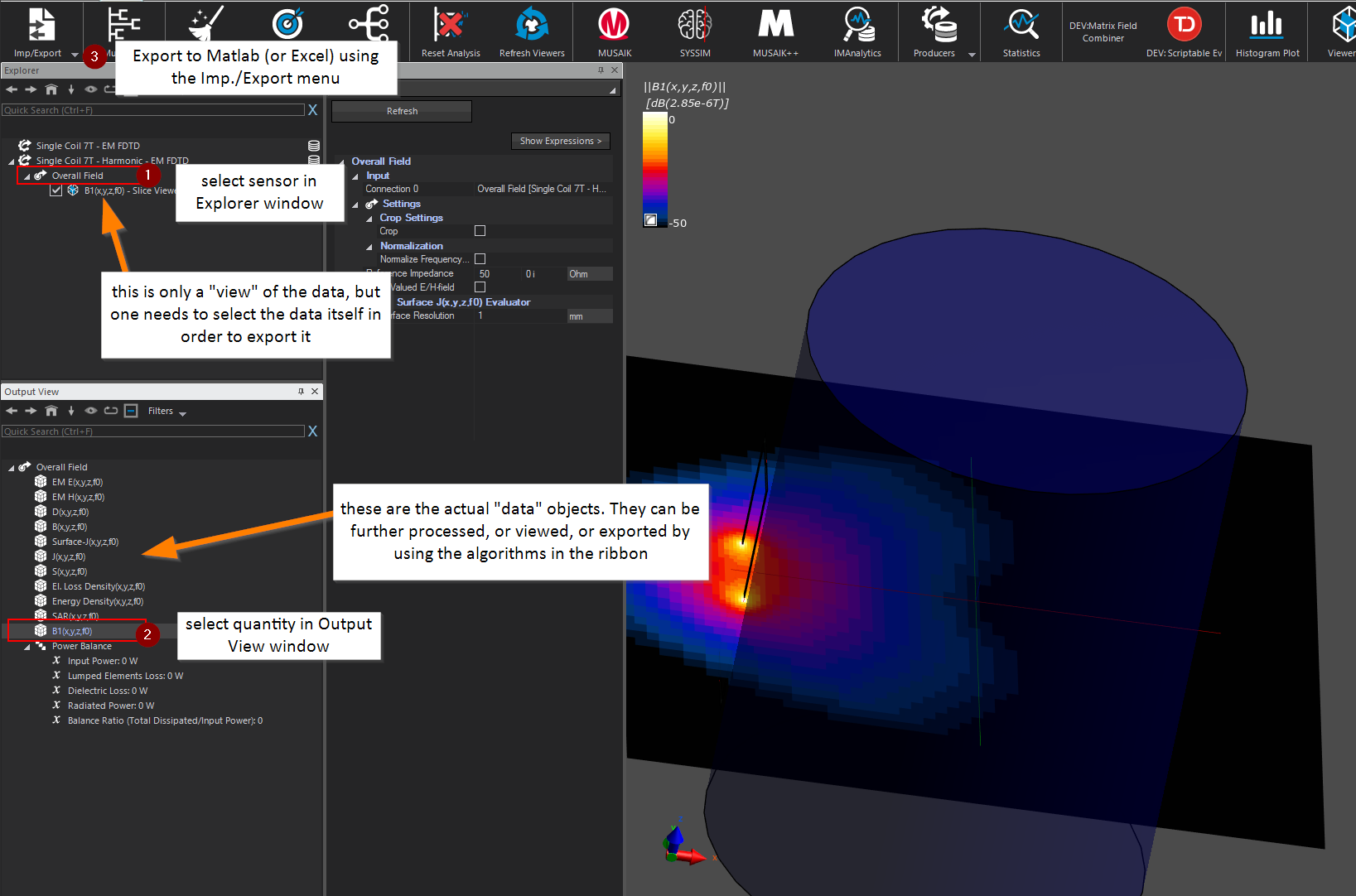
  • How to export data (e.g. the B1 field)

    export matlab excel results
    2
    0 Votes
    2 Posts
    2k Views
    pcrespoP
    One needs to be careful with the naming of the quantities. Notice that B1(x,y,z,f0) refers to a field with two components, namely (B1+, B1-) !!!! I personally find the name a bit unfortunate but it was directly taken from MRI jargon where they denote B1 to the RF B-field to distinguish it from the static magnetic field, denoted as B0. Do NOT confuse with B(x,y,z,f0) that is a C^3 quantity with (Bx, By, Bz) components!! Check in the manual B1(x,y,z,f0) for more details.

  • Streamline view_arbitrary plane

    python
    2
    1 Votes
    2 Posts
    1k Views
    SylvainS
    Hi, Yes, this is possible, as shown in the example below. Note that this sort of scripts can in principle be automatically generated using the "To Python" function from the GUI (in this case by right-clicking on the Streamline Viewer). Here, however, the autogenerated script did not fully work, as it forgets a crucial Update() call before setting up the Plane Center and Normal. I hope this helps! # Creating the analysis pipeline # Adding a new SimulationExtractor simulation = document.AllSimulations["EM"] simulation_extractor = simulation.Results() # Adding a new EmSensorExtractor em_sensor_extractor = simulation_extractor["Overall Field"] document.AllAlgorithms.Add(em_sensor_extractor) # Adding a new StreamLineViewer inputs = [em_sensor_extractor.Outputs["EM E(x,y,z,f0)"]] stream_line_viewer = analysis.viewers.StreamLineViewer(inputs=inputs) stream_line_viewer.Streamline.SeedSource = stream_line_viewer.Streamline.SeedSource.enum.PlaneSource stream_line_viewer.Update() # this line is needed, otherwise the next lines have no effect stream_line_viewer.Streamline.Plane.PlaneCenter = numpy.array([0.2, 0.05, 0.002]) stream_line_viewer.Streamline.Plane.PlaneNormal = numpy.array([0.2, 0.5, 1.2]) stream_line_viewer.Update() document.AllAlgorithms.Add(stream_line_viewer)
  • Power Balance

    2
    0 Votes
    2 Posts
    845 Views
    SylvainS
    The Power Balance works for both harmonic and Gaussian simulations. The computation is done for the "extracted frequencies" of a given field sensor (usually the "overall field" sensor). Harmonic simulations have just one extracted frequency whereas Gaussian ones can have several. That's the only difference, as far as the Power Balance is concerned.
  • IMSAFE tool: how is the tangential E-field computed?

    imsafe
    1
    0 Votes
    1 Posts
    811 Views
    No one has replied
  • 0 Votes
    1 Posts
    984 Views
    No one has replied