Avoid solid
-
Hi,
I am modeling some neural pathways and portions of it go along the muscle layer in the human body model. Is it possible to avoid solid intersection?
I came across something like this in the IMSafe toolbox:
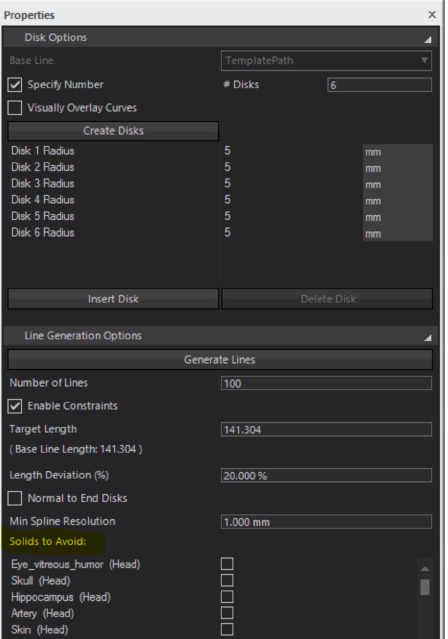
So I'm wondering if it is possible to do this using Python.
Thanks!
-
Here is a script I found. Not sure it still runs, but I guess it should help you get started:
import tempfile import os import s4l_v1.model as model from s4l_v1.model import Vec3, Unit import s4l_v1.simulation as simulators import s4l_v1.simulation.emfdtd as emfdtd # Preamble --------------- import s4l_v1.document as doc sim = doc.AllSimulations[0] # assumptions sphere = model.AllEntities()["Sphere 1"] assert sphere assert isinstance(sim, emfdtd.Simulation) sim_xtor = sim.Results() # pin this variable, otherwise wrapped members are deleted efield_port = sim_xtor["Overall Field"]["EM E(x,y,z,f0)"] hfield_port = sim_xtor["Overall Field"]["EM H(x,y,z,f0)"] # Demo --------------------------------------------------- from s4l_v1.analysis.em_evaluators import ImplantSafety from s4l_v1.analysis import RegisterAlgorithm # Creates ImSafe algorithm imsafe = ImplantSafety() # 0. create algorithm and connect to e-field port imsafe.SetInputConnection(0, hfield_port) # Disks options base_line = model.CreateSpline([Vec3(52.0, 0.0, 0.0), Vec3(0, 32, 0), Vec3(-9, 70, 0)]) imsafe.SetBaseLine(base_line) # 1. define baseline total_len = imsafe.EvalBaseLineLength() imsafe.ModelUnits = Unit.MilliMeter imsafe.SetDisks( position=[0, 0.1, 1], radii=[10.0] * 3 ) # 2. define disks along baseline centers, normals, radii = imsafe.GetDisks() print("centers", centers, imsafe.ModelUnits) print("normals", normals, imsafe.ModelUnits) print("radii", radii, imsafe.ModelUnits) # Line generation options #3. setup line options imsafe.NumberOfLinesProp.Value = 5 imsafe.LengthDeviationProp.Value = 10 # % imsafe.NormalToEndDisksProp.Value = True imsafe.MinSplineResolutionProp.Value = 0.01 * total_len # or # imsafe.MinSplineResolutionProp.SetValueAs(0.05, Unit.Meter) imsafe.EnableConstraintsProp.Value = False # 4. setup obstacles imsafe.SetAsObstacles([sphere]) RegisterAlgorithm(imsafe) assert imsafe.UpdateAttributes(), "Guarantees output ports are updated" imsafe.ClearOutputLines() assert imsafe.Update(0) filepath = os.path.join(tempfile.mkdtemp(), "line.txt") print("Exporting to", filepath) imsafe.ExportLines(filepath, snapshot_index=0) imsafe.ClearOutputLines() imsafe.ImportLines(filepath) # Creates viewer import s4l_v1.analysis.viewers as viewers dv = viewers.SurfaceViewer() dv.SetInputConnection(0, imsafe.GetOutputPort(2)) RegisterAlgorithm(dv) -
- it simply takes the first simulation. Note, the evaluator needs an existing simulation because it tests if the splines pass through voxels of the "Entities to Avoid" list
- the entities to avoid are set via
SetAsObstacles(entity_list). the script assumes this entity is called "Sphere `" - the script creates a spline as baseline, but you could also create the baseline in the GUI, and get it via
base_line = model.AllEntities()["My Baseline"]

Hello! It looks like you're interested in this conversation, but you don't have an account yet.
Getting fed up of having to scroll through the same posts each visit? When you register for an account, you'll always come back to exactly where you were before, and choose to be notified of new replies (either via email, or push notification). You'll also be able to save bookmarks and upvote posts to show your appreciation to other community members.
With your input, this post could be even better 💗
Register Login