Running iSolve on GPU
-
I'm trying to run a simulation on iSolve using a GPU (NVIDIA GeForce RTX 3090) on a Linux machine running Ubuntu 20.04.6 LTS. I have a license that allows a simulation to be run on a single GPU. I've followed the instructions to install iSolve in the manual and added the following lines to my bashrc:
export AX_USE_UNSUPPORTED_CARDS=1
export SEMCADX_CUDA_ADDITIONAL_CARDS="GeForce RTX 3090"
export CUDA_VISIBLE_DEVICES=1
export LD_LIBRARY_PATH=[path to iSolve]:$LD_LIBRARY_PATH
export LM_LICENSE_FILE=[path to license file]
However, when I run a simulation using iSolve, it uses CPU by default. Is there a way I can specify that I want the simulations to run on GPU? I am testing a very small simulation based on a tutorial, so I don't think memory is an issue. Thanks!
-
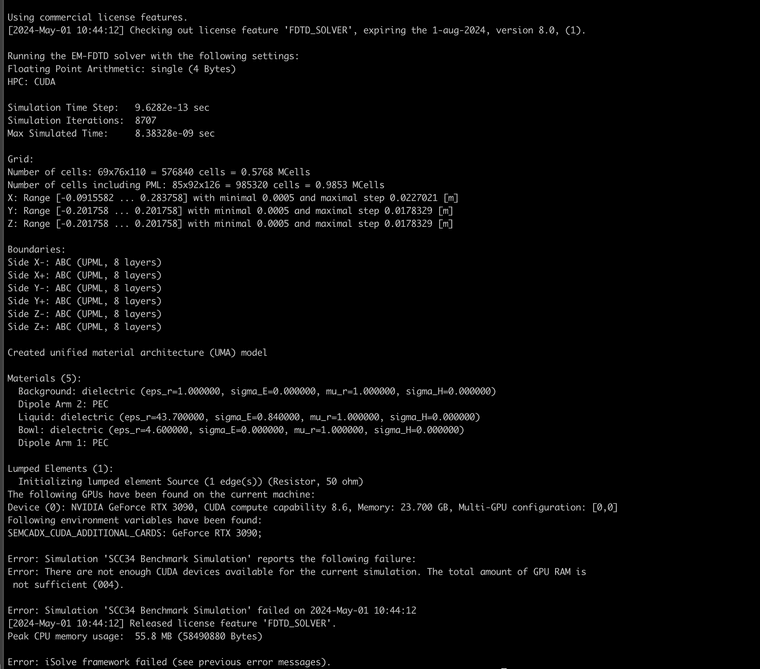
Thank you! I hadn't changed the Kernel, but now I have changed it to CUDA. However, I get an "out of memory" error. Is there really not sufficient GPU memory (24GB) to run a sim of ~576k cells? The simulation is the IEEE-SCC34 tutorial. See screenshot below.
Hello! It looks like you're interested in this conversation, but you don't have an account yet.
Getting fed up of having to scroll through the same posts each visit? When you register for an account, you'll always come back to exactly where you were before, and choose to be notified of new replies (either via email, or push notification). You'll also be able to save bookmarks and upvote posts to show your appreciation to other community members.
With your input, this post could be even better 💗
Register Login