Skip to content
  • Search
Skins
  • Light
  • Brite
  • Cerulean
  • Cosmo
  • Flatly
  • Journal
  • Litera
  • Lumen
  • Lux
  • Materia
  • Minty
  • Morph
  • Pulse
  • Sandstone
  • Simplex
  • Sketchy
  • Spacelab
  • United
  • Yeti
  • Zephyr
  • Dark
  • Cyborg
  • Darkly
  • Quartz
  • Slate
  • Solar
  • Superhero
  • Vapor

  • Default (No Skin)
  • No Skin
Collapse

ZMT zurich med tech

  1. Home
  2. Sim4Life
  3. Simulations & Solvers
  4. Question about setting up sources in acoustic simulations

Question about setting up sources in acoustic simulations

Scheduled Pinned Locked Moved Simulations & Solvers
2 Posts 2 Posters 668 Views 2 Watching
  • Oldest to Newest
  • Newest to Oldest
  • Most Votes
Reply
  • Reply as topic
Log in to reply
This topic has been deleted. Only users with topic management privileges can see it.
  • K Offline
    K Offline
    Kihyun
    wrote on last edited by
    #1

    Hello, I bring in Sim4life in August and am currently studying it.

    I want to change the power source of the sound module.
    For example, I want to input a source that outputs 1% per second at Vpp: 10V, F = 500kHz.
    I don't know how to set this up. Can you help me?

    1 Reply Last reply
    0
    • H Offline
      H Offline
      halder
      ZMT
      wrote on last edited by
      #2

      Hi @Kihyun,

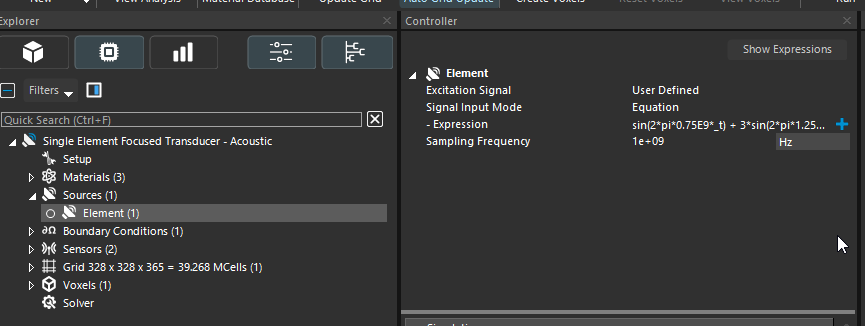
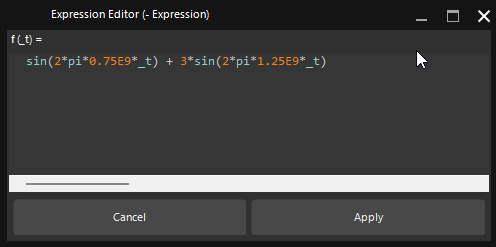
      To create an acoustic simulation, click on “Sources”, then change the excitation signal from “Sinusoidal” to “User Defined.”
      This will provide an “Expression” field that you can edit as needed.

      I also recommend checking the Acoustic Tutorial in Section 3.7 of the Sim4Life Manual, which you can access from the top ribbon under “Help.”
      Sim4Life_Jvkul06ruI.png
      Sim4Life_Q3dc6OMg4u.png

      1 Reply Last reply
      0

      Hello! It looks like you're interested in this conversation, but you don't have an account yet.

      Getting fed up of having to scroll through the same posts each visit? When you register for an account, you'll always come back to exactly where you were before, and choose to be notified of new replies (either via email, or push notification). You'll also be able to save bookmarks and upvote posts to show your appreciation to other community members.

      With your input, this post could be even better 💗

      Register Login
      Reply
      • Reply as topic
      Log in to reply
      • Oldest to Newest
      • Newest to Oldest
      • Most Votes


      • Login

      • Don't have an account? Register

      • Login or register to search.
      • First post
        Last post
      0
      • Search