How to interpret JsonDataObject data (e.g. from Statistics evaluator)
-
Recently I was trying to extract the average field value using the Sim4Life Python API. Since I found interpreting the JsonDataObject a bit difficult, I will share the code here. Hope it helps.
# -*- coding: utf-8 -*-
# This script was auto-generated by Sim4Life version 7.1.0.8835

import numpy
import s4l_v1.analysis as analysis
import s4l_v1.document as document
import s4l_v1.model as model
import s4l_v1.units as units
from s4l_v1 import ReleaseVersion
from s4l_v1 import Unit

try:
    # Define the version to use for default values
    ReleaseVersion.set_active(ReleaseVersion.version7_1)

    # Creating the analysis pipeline
    # Adding a new SimulationExtractor
    simulation = document.AllSimulations["EM"]
    simulation_extractor = simulation.Results()

    # Adding a new EmSensorExtractor
    em_sensor_extractor = simulation_extractor["Overall Field"]
    em_sensor_extractor.FrequencySettings.ExtractedFrequency = u"All"
    em_sensor_extractor.SurfaceCurrent.SurfaceResolution = 0.001, units.Meters
    document.AllAlgorithms.Add(em_sensor_extractor)

    # Adding a new StatisticsEvaluator
    inputs = [em_sensor_extractor.Outputs["SAR(x,y,z,f0)"]]
    statistics_evaluator = analysis.core.StatisticsEvaluator(inputs=inputs)
    statistics_evaluator.Mode = u"Value"
    statistics_evaluator.UpdateAttributes()
    document.AllAlgorithms.Add(statistics_evaluator)
    statistics_evaluator.Update()

    # Get JsonDataObject output and print the values
    stats = statistics_evaluator.Outputs[0].Data.DataSimpleDataCollection
    for k in stats.Keys():
        v = stats.FieldValue(k, 0)
        unit = stats.FieldUnit(k)
        name = stats.FieldDescription(k)
        print(f"{name} = {v} {unit}")

except Exception as exc:
    import traceback
    traceback.print_exc()
    # Reset active version to default
    ReleaseVersion.reset()
    raise(exc)
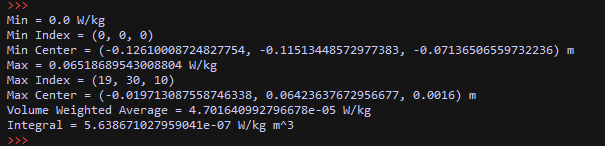
The output is:

Hello! It looks like you're interested in this conversation, but you don't have an account yet.
Getting fed up of having to scroll through the same posts each visit? When you register for an account, you'll always come back to exactly where you were before, and choose to be notified of new replies (either via email, or push notification). You'll also be able to save bookmarks and upvote posts to show your appreciation to other community members.
With your input, this post could be even better 💗
Register Login