New PC, new installation (v8): No matching solver found to process the simulation.
-
Dear ladies and gentlemen,
although all the licenses seem to be recognized in the license check, I got these errors when I try to run an FDTD tutorial with or without CUDA solver:
OpenGL view 4.6.0 NVIDIA 555.99[NVIDIA RTX A6000/PCIe/SSE2], backwards compatible, 8 multi-samples
ERROR: [CRegKeyReader]Failed to open key: Software\Wow6432Node\ZMT Zurich MedTech AG
GPU: NVIDIA RTX A6000
Vulkan view 0.1.3.278[Vulkan - NVIDIA RTX A6000 (2329460736)], 8 multi-samples
08:49:54] Checking out license feature 'MODELING', expiring the 1-oct-2024, version 1.3, (1).
to local Ares successfully established.
produced by Sim4Life version 8.0.0.14520
Voxeler Report: Complete Voxel Scene
Scene Memory Consumption: 0.001442 GB
Clock Time: 0.138517 s
produced by Sim4Life version 8.0.0.15165
and Submitting Solver Job(s) for Coax to Waveguide Transition
solver input file(s) for Coax to Waveguide Transition
Rectilinear Discretization to Input File. Elapse Time: 0.0492471 s
ERROR: No matching solver found to process the simulation.
ERROR: PdhAddCounter for processor total failed
ERROR: PdhCollectQueryData failed
ERROR: PdhCollectQueryData failed
produced by Sim4Life version 8.0.0.15165
have been no model changes since the last time was saved. Last change: Tue Aug 20 09:32:43 2024
and Submitting Solver Job(s) for Coax to Waveguide Transition
solver input file(s) for Coax to Waveguide Transition
Rectilinear Discretization to Input File. Elapse Time: 0.0498681 s
ERROR: No matching solver found to process the simulation.
produced by Sim4Life version 8.0.0.15165
have been no model changes since the last time was saved. Last change: Tue Aug 20 09:32:43 2024
and Submitting Solver Job(s) for Coax to Waveguide Transition
solver input file(s) for Coax to Waveguide Transition
Rectilinear Discretization to Input File. Elapse Time: 0.0494432 s
ERROR: No matching solver found to process the simulation.Thanks in advance for your tips.
Ali -
Dear Ali,
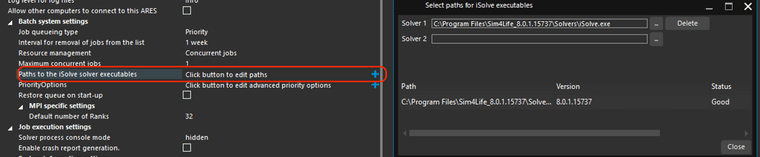
It looks like the path to iSolve is not set correctly. Please follow the steps below:
- Open Ares on the machine where Sim4Life is installed
- Click on the blue cross at the end of the line labeled "Paths to the iSolve solver executables." This will open a pop-up window. (see the image below)
- If the list of solvers is empty or the one you intend to use is not listed, simply add the path to the relevant solver.
- Restart Sim4Life.


Hello! It looks like you're interested in this conversation, but you don't have an account yet.
Getting fed up of having to scroll through the same posts each visit? When you register for an account, you'll always come back to exactly where you were before, and choose to be notified of new replies (either via email, or push notification). You'll also be able to save bookmarks and upvote posts to show your appreciation to other community members.
With your input, this post could be even better 💗
Register Login