Create solid region mask from skin
-
Recently I was asked by a user how to make a solid (uniform = single material) model of a subregion of an anatomical model, e.g. the arm.
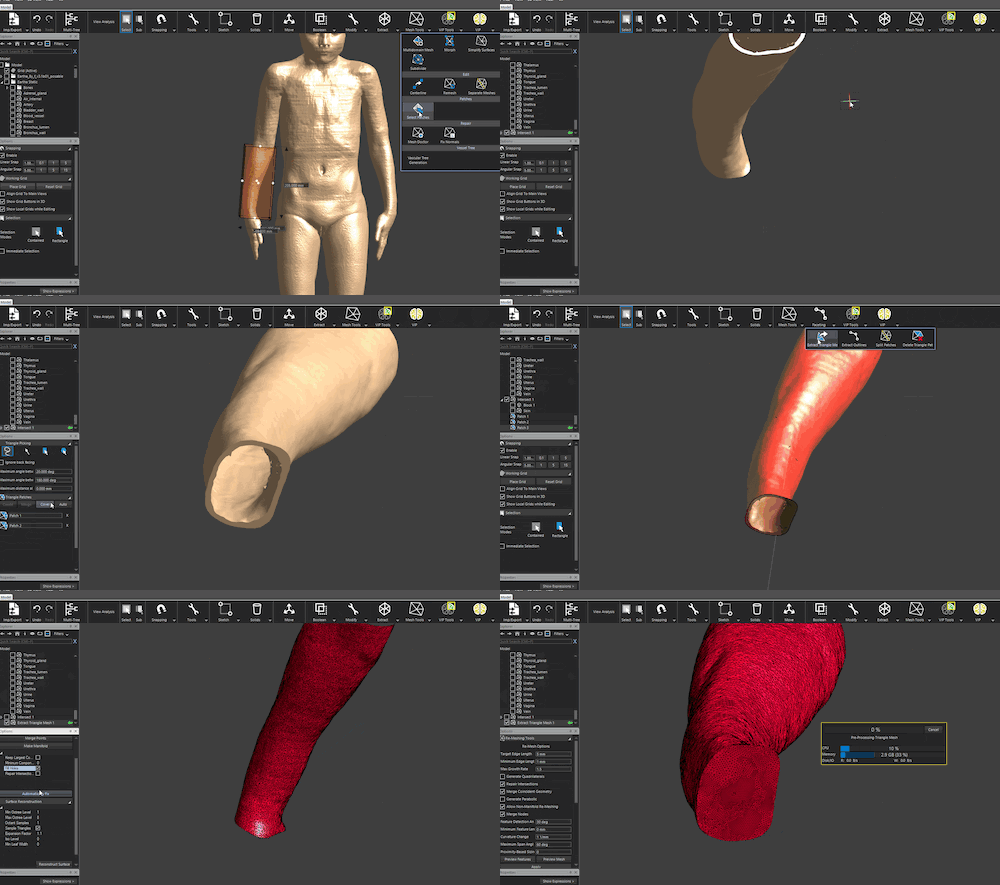
Here is what I proposed, with a short animation to illustrate the workflow.
- boolean Intersect the skin with a box (first run Mesh Tools -> Mesh Doctor -> Make Manifold, to ensure the boolean intersect is robust)
- use the patch selection tool (Mesh Tools -> Select Patches) to select the outer surface of the skin
- extract the patch as a triangle mesh
- use the Mesh Doctor to close the top/bottom holes
- optionally optimize the closed triangle mesh using the Mesh Tools -> Remesh tool
Click on the image below to view the gif animation:
-
Hi @hyh , the forum does not allow me to embed the original high-res gif. So here is a dropbox link:
https://www.dropbox.com/s/vflbgwelg5y9ci2/solid_arm.gif?dl=0


Hello! It looks like you're interested in this conversation, but you don't have an account yet.
Getting fed up of having to scroll through the same posts each visit? When you register for an account, you'll always come back to exactly where you were before, and choose to be notified of new replies (either via email, or push notification). You'll also be able to save bookmarks and upvote posts to show your appreciation to other community members.
With your input, this post could be even better 💗
Register Login